40% reduction in slow response and no communication issues
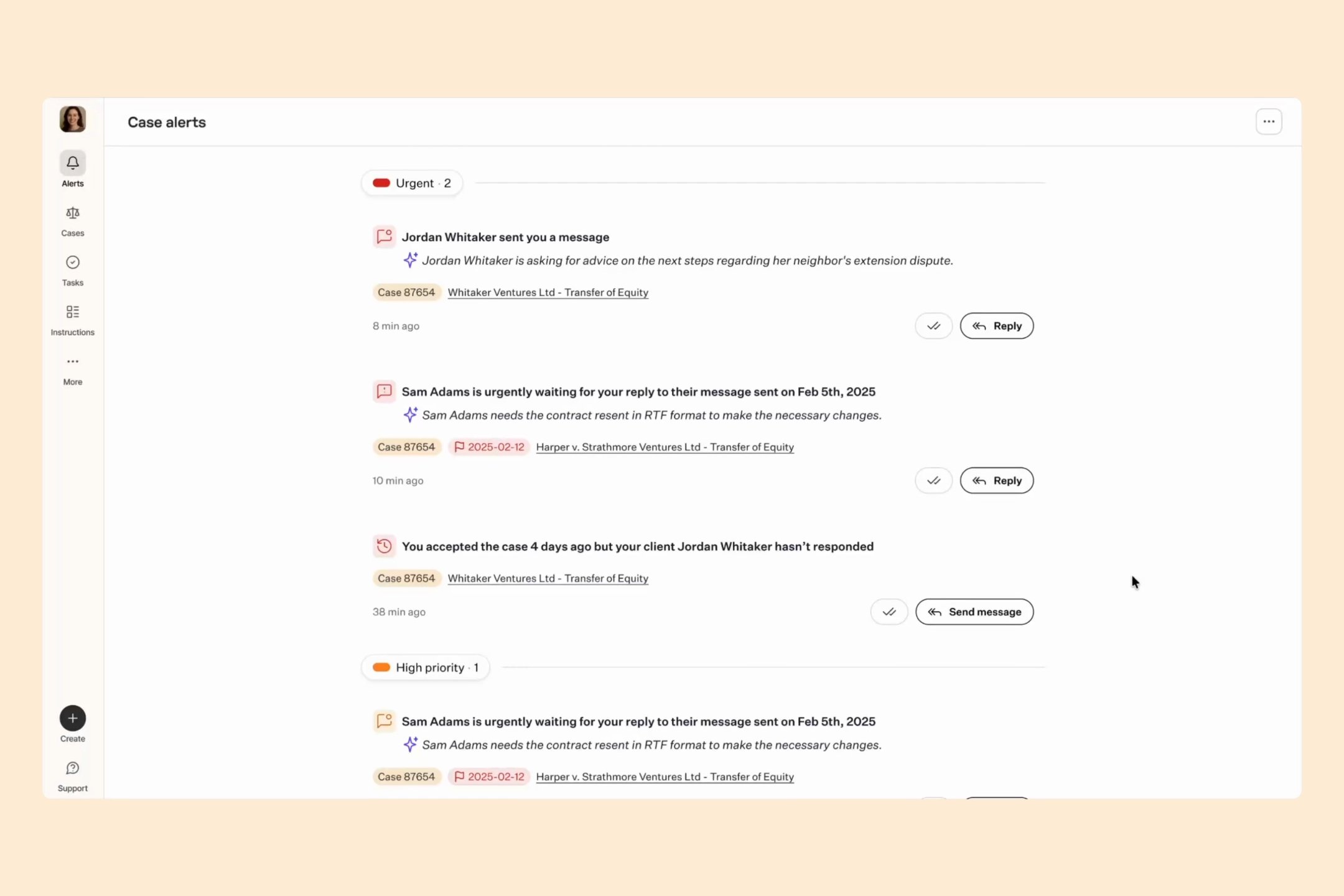
AI prioritization, contextual summaries, and inline reply actions enabled instant client responses from the notification feed. Reduced monthly communication failures from 708 incidents to 425 — a 40% improvement in lawyer responsiveness.
90% faster document creation
Document creation turned from a 30-minute task into a 3-minute task. No more juggling Word docs and manual uploads. Lawyers can now create professional, client-ready documents in one place.
75% time reduction to fill legal forms
Forms that used to take 2-3 hours now take 20-30 minutes. Lawyers skip the repetitive data entry and focus only on the fields that actually require legal judgment.
Lawhive is reinventing legal services, connecting clients and lawyers with one cohesive, AI-powered platform. Its mission: make legal work clearer, faster, and more efficient by eliminating repetitive tasks and simplifying complex cases.
Lawyers were drowning in administrative overhead — juggling multiple tools, scattered communication threads, repetitive document creation, and manual tracking of case updates. The existing platform worked, but it didn't help. It added friction instead of removing it.
Our goal: create a truly seamless workflow so the product empowers lawyers to do their best work, not get in their way.
We focused on the daily tasks that matter most:
- Case alerts and notifications
- Agreement and document creation
- Form handling and workflows
Platform audit
Before diving into feature work, we needed to understand what was actually broken. We conducted a comprehensive audit of the existing platform — mapping workflows, analyzing user behavior, and identifying friction points across the lawyer experience.
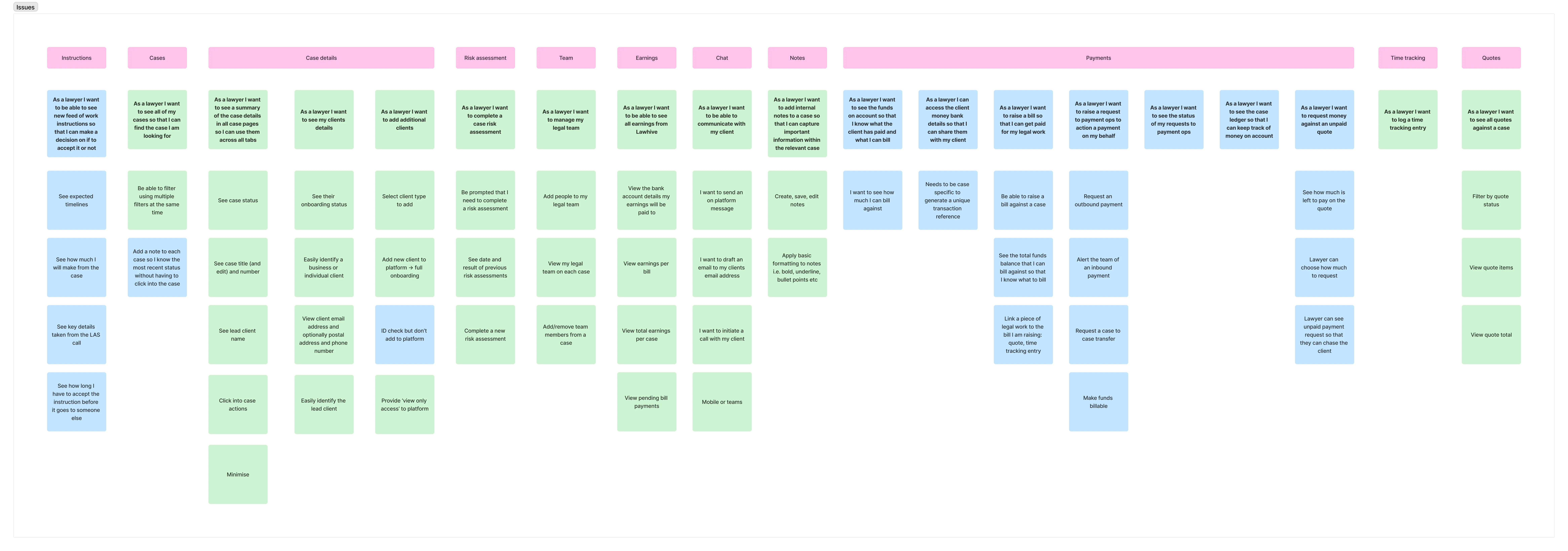
Platform audit
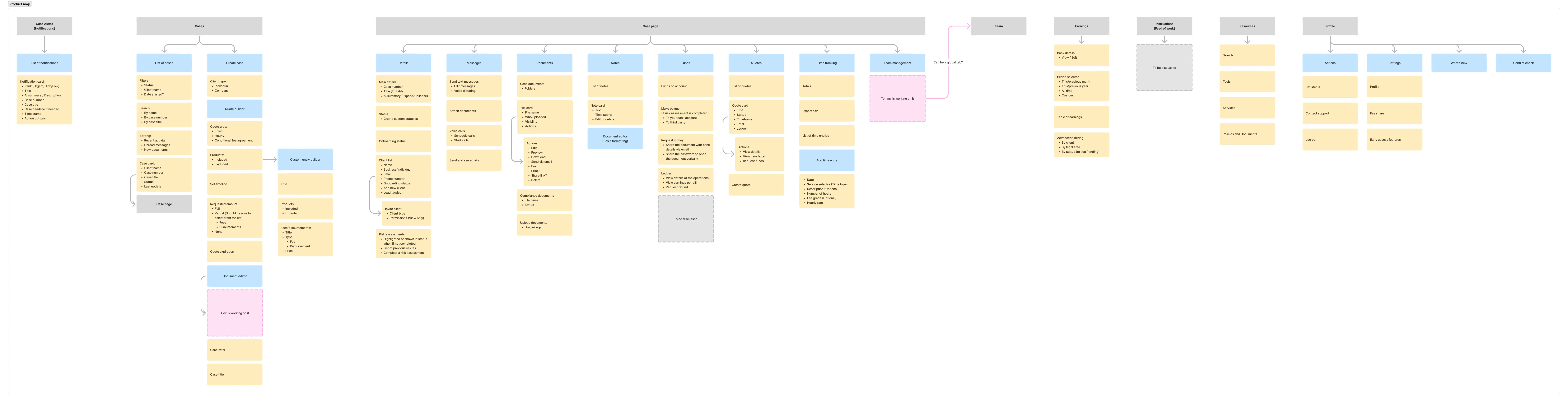
Product mapping
What we found
The audit revealed systematic issues across core workflows:
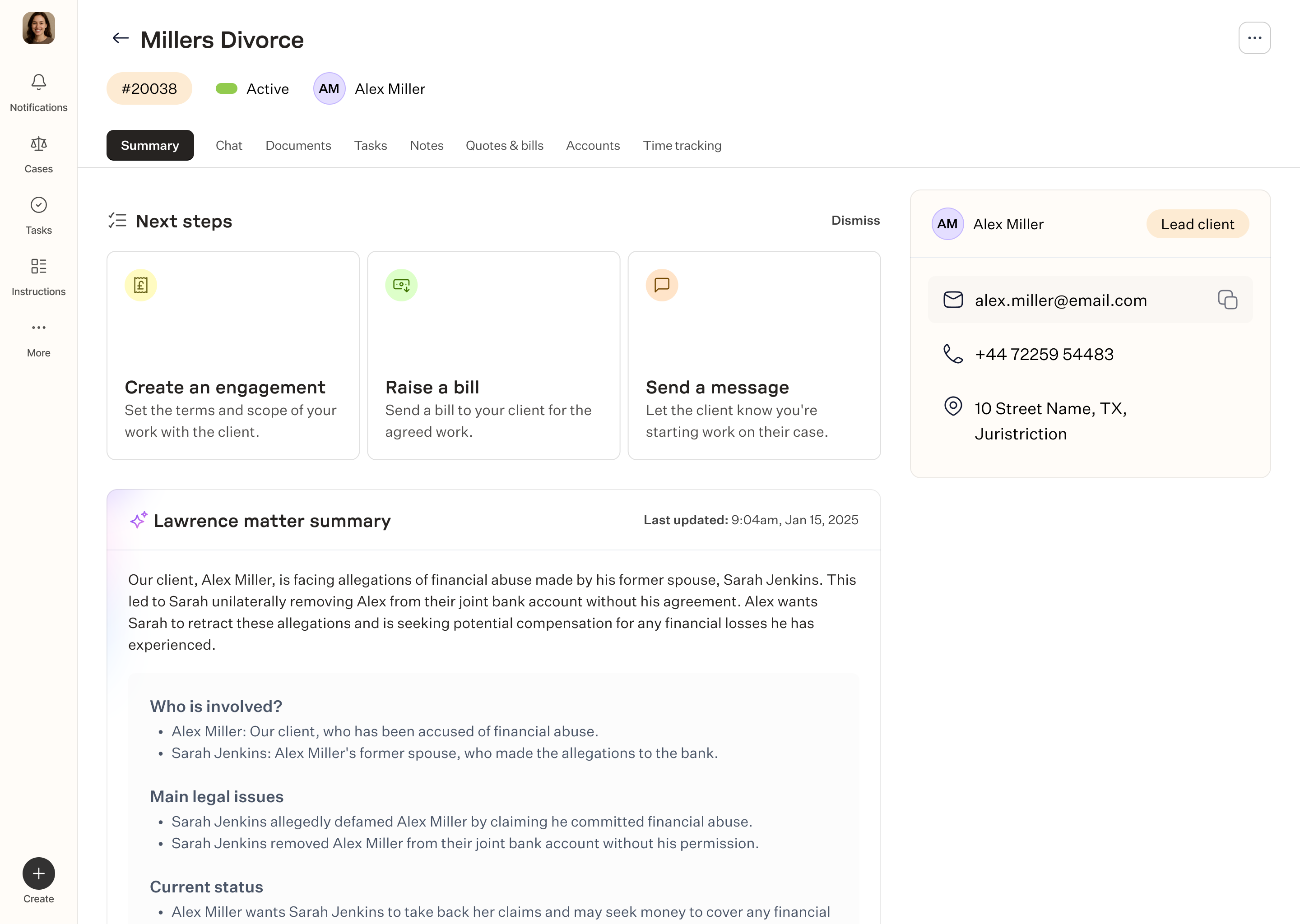
Case details
- Information architecture was flat — no hierarchy or priority
- Key actions (send message, upload document, generate form) were buried or hard to find
- Case history and activity log mixed everything together instead of separating communications, documents, and system updates
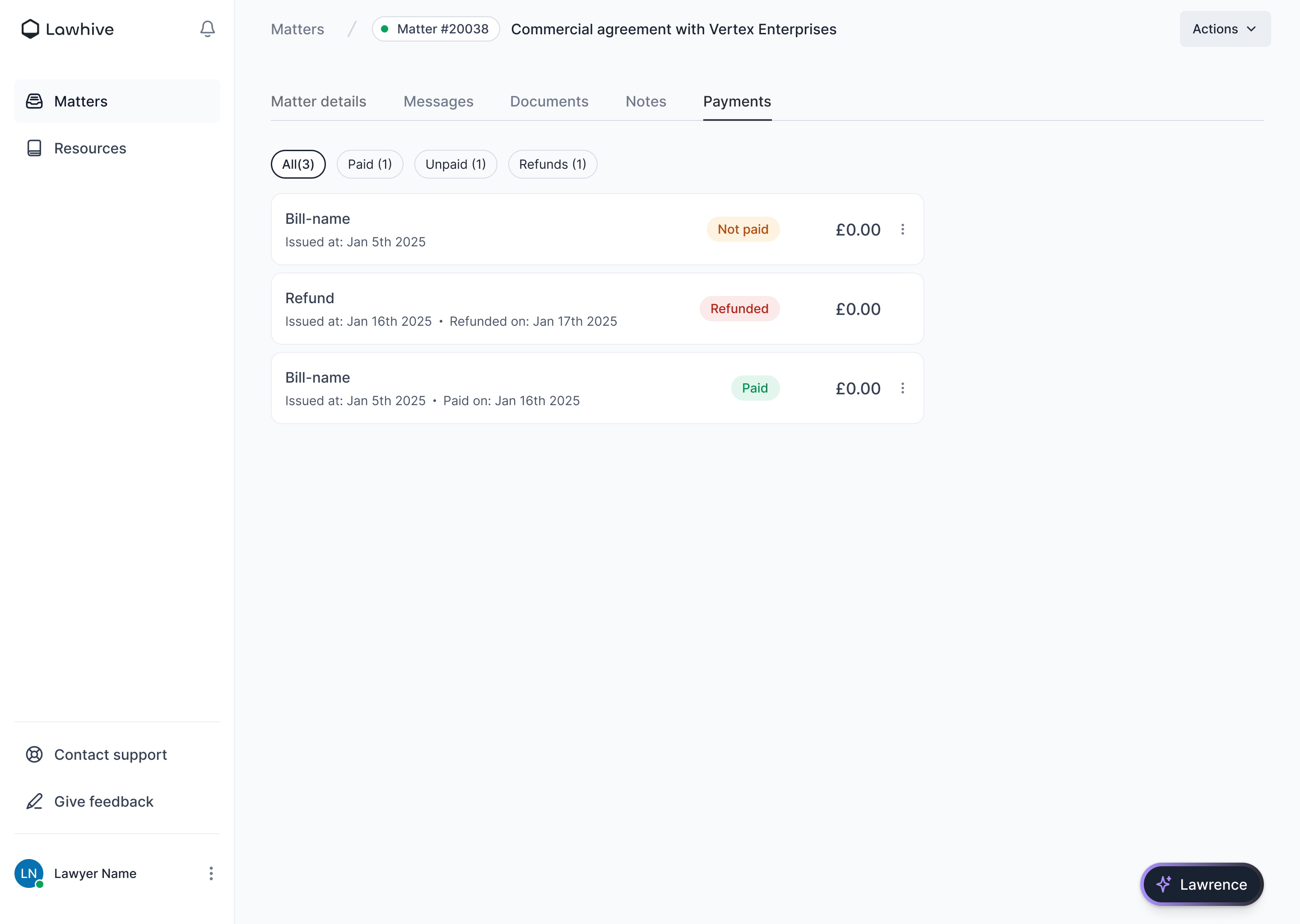
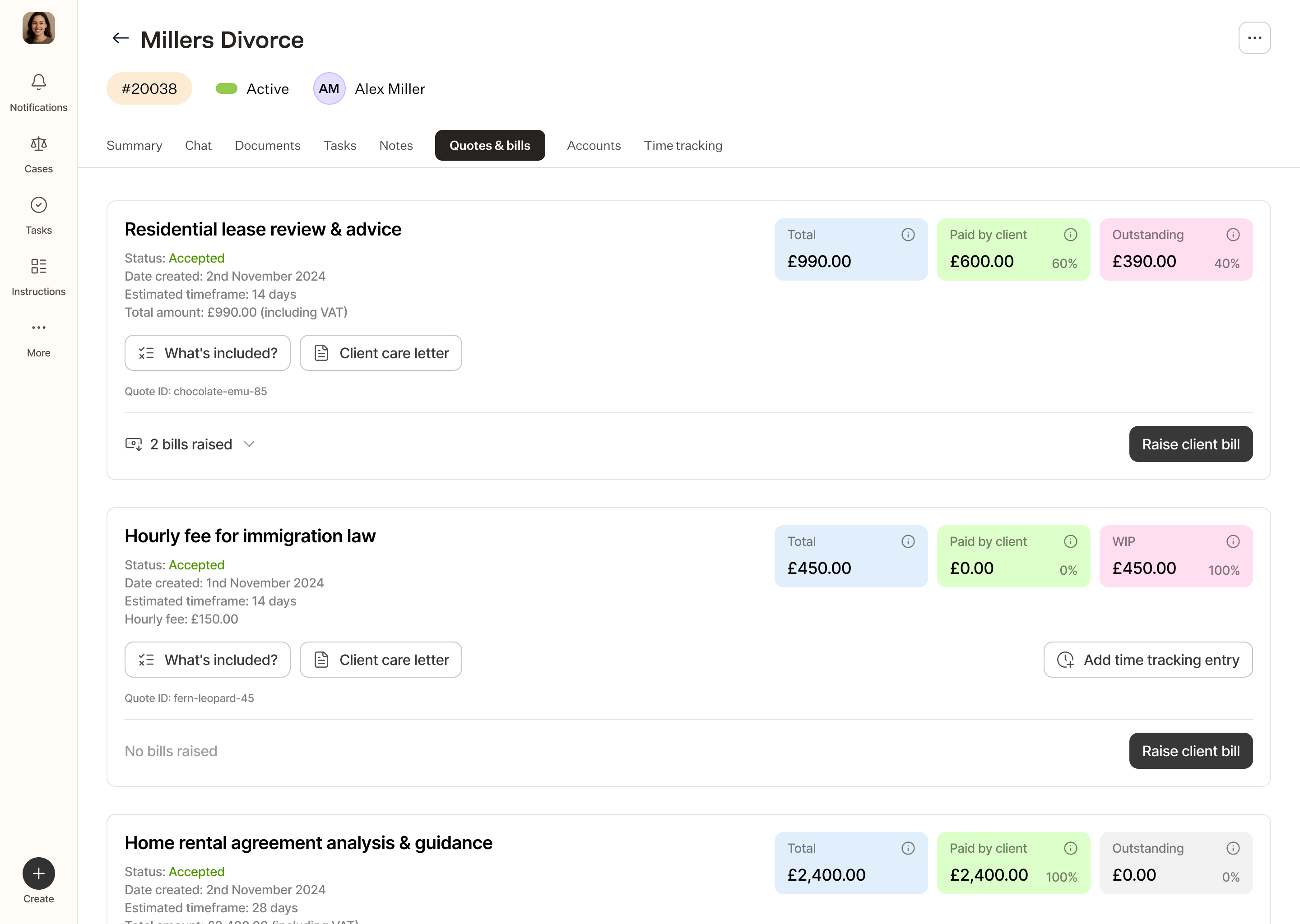
Earnings
- How legal fees are structured and calculated wasn't clear to lawyers
- "View your bank statements" and "see old billing info" were mixed together with no clear separation
- Lawyers couldn't easily see what they'd earned vs. what was pending vs. what was paid
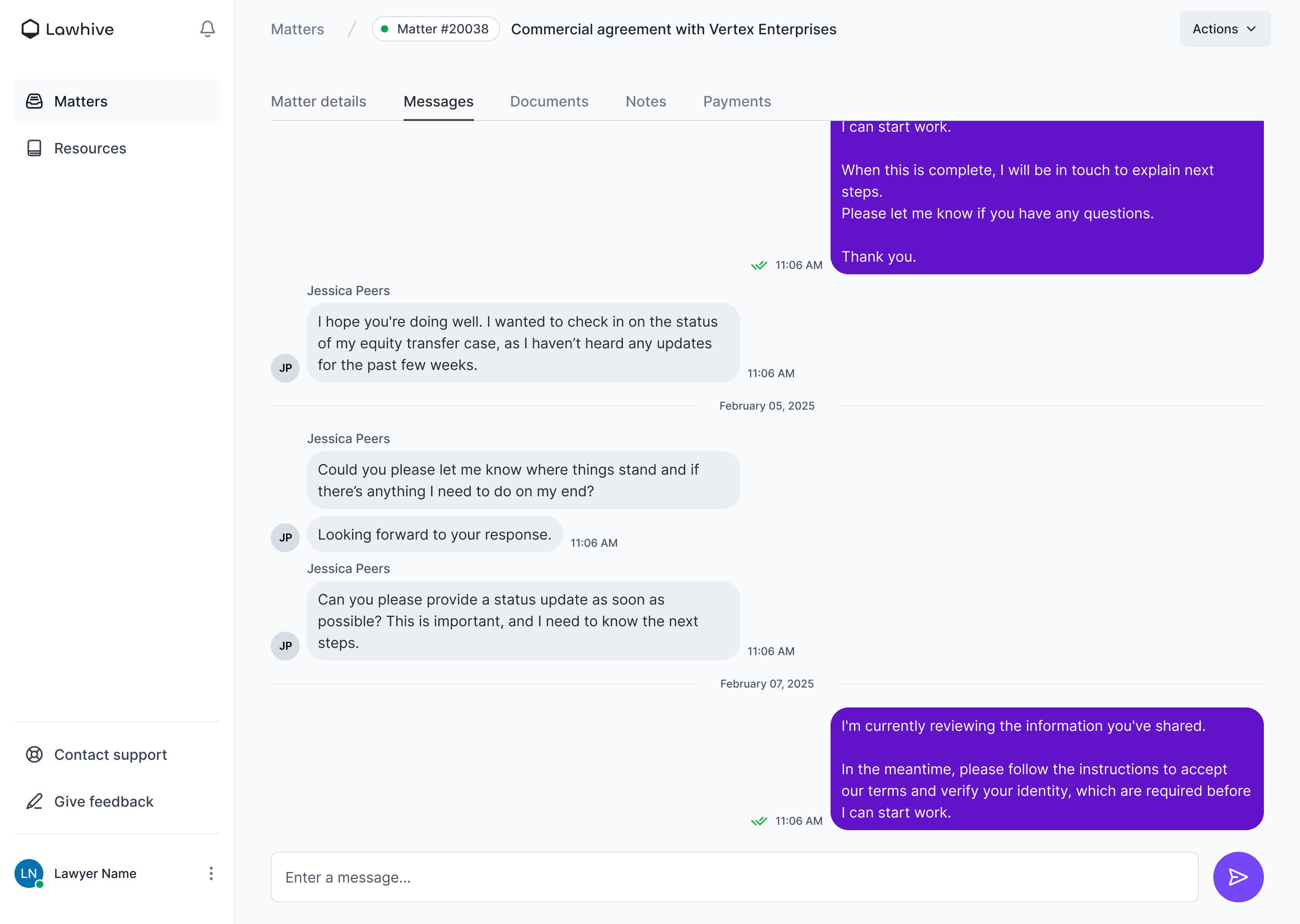
Chat
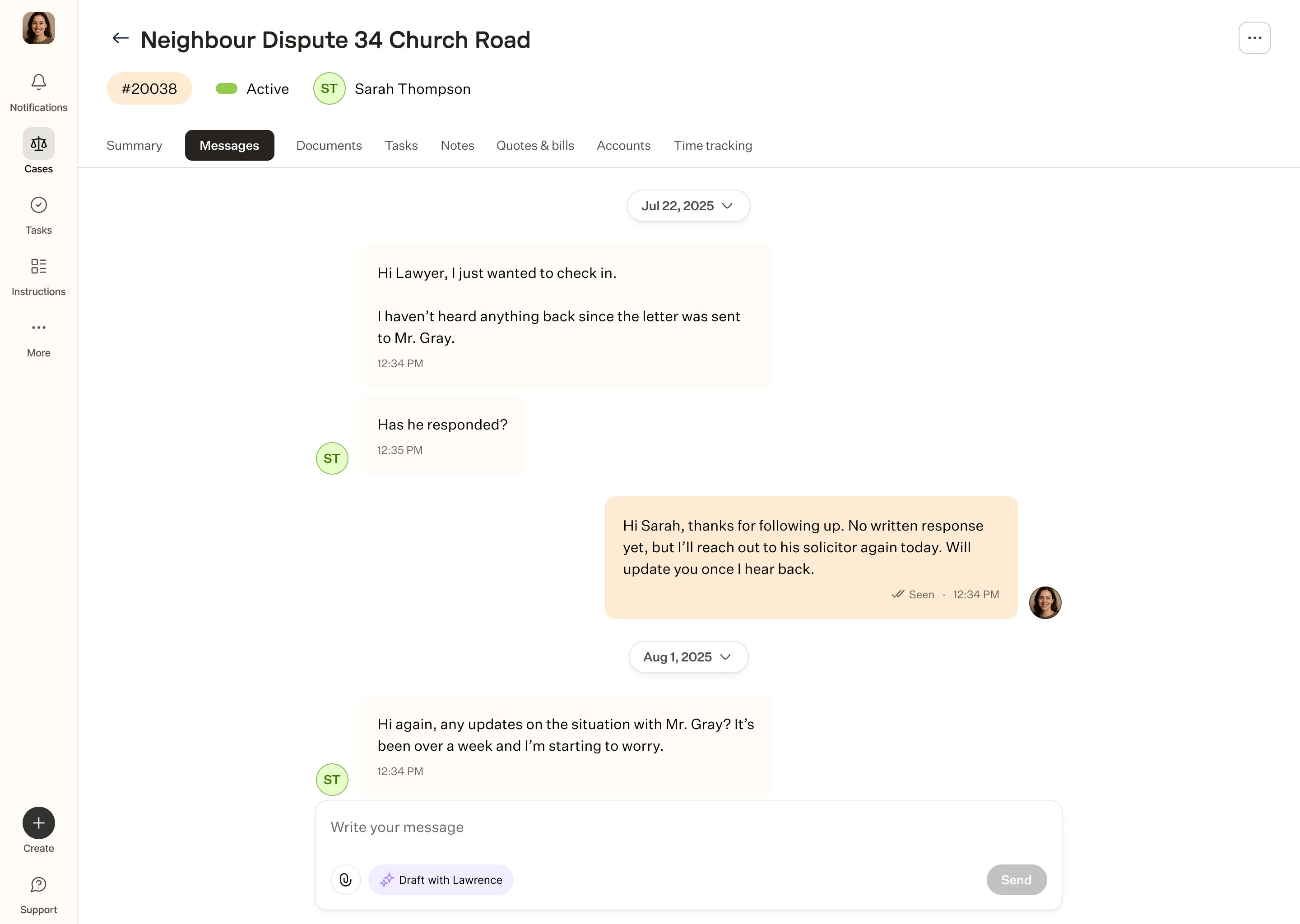
- Sending messages required too many clicks — opening a modal, selecting recipient, typing, confirming
- No threading or conversation history — every message felt isolated
- Clients and internal team chats weren't separated, creating confusion about who would see what
And more:
- Risk scoring existed but wasn't actionable — lawyers saw a number but didn't know what to do with it
- Adding new clients to a platform required manual setup every time — no bulk actions or templates
- Notes were case-specific but not organized by type (client notes, internal strategy, billing notes)
- Requests on declined payment were sent without context — lawyers didn't know why a payment failed or what to do next
- Lawyers had to respond manually to requests for new quotes without templates or saved pricing structures
Case alerts
Lawyers were getting buried in notifications. Every client message, case update, and deadline created an alert — but not all alerts are equally urgent. Without prioritization, critical tasks got lost in the noise, and lawyers had to manually sift through everything to figure out what actually needed their attention.
We designed alerts around two core principles: intelligent prioritization and immediate action.
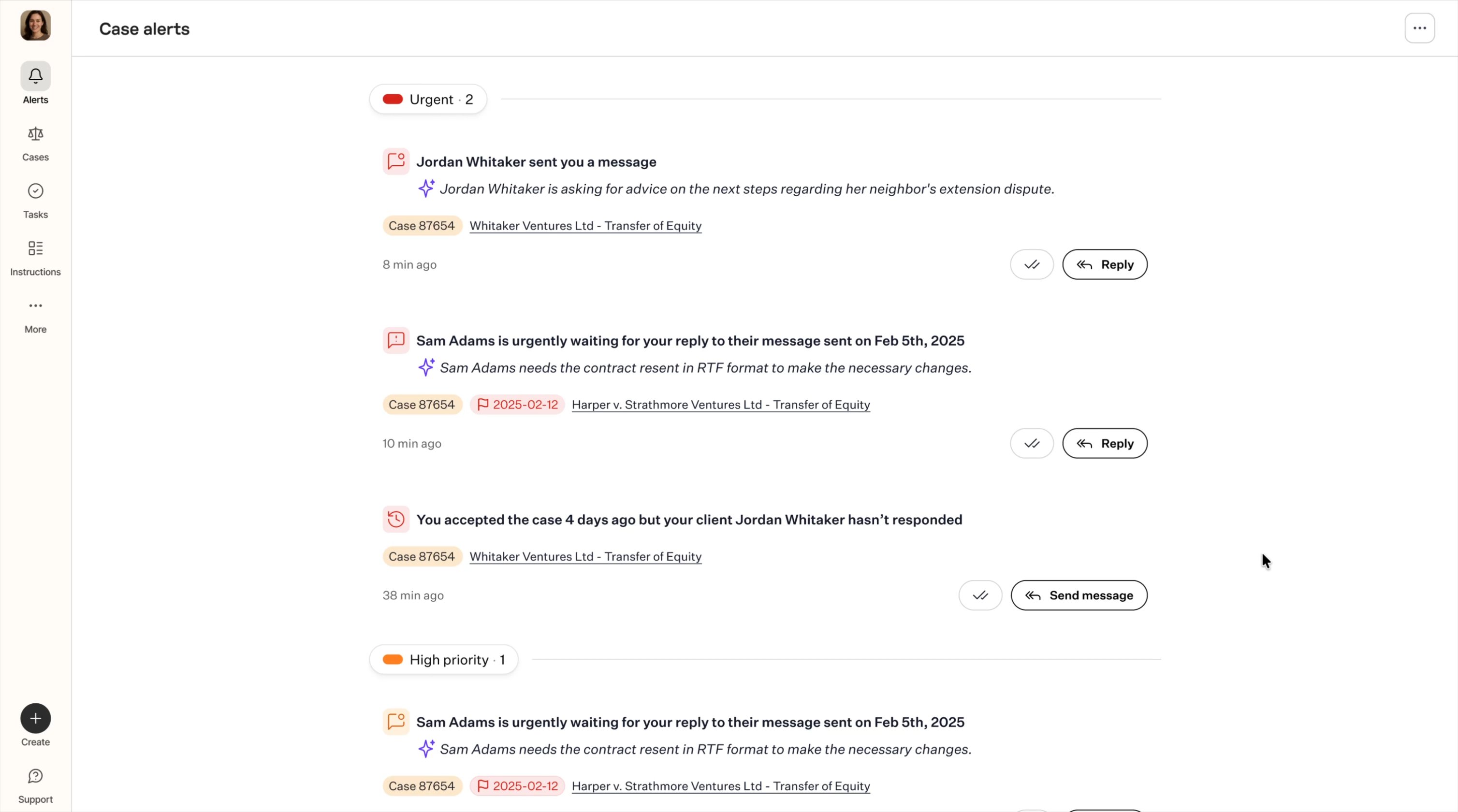
Prototype of single case alert.
Prototype of single case alert.
AI-powered prioritization
Alerts are automatically sorted by urgency — not just chronologically. The system uses AI to determine what's truly time-sensitive:
- Urgent (red) — client waiting for a response, approaching deadline, or critical case update
- High priority (orange) — important but not immediately blocking
- Other alerts (gray) — informational updates that don't require instant action
This means lawyers see what matters most first — and can quickly scan the rest without missing anything critical.
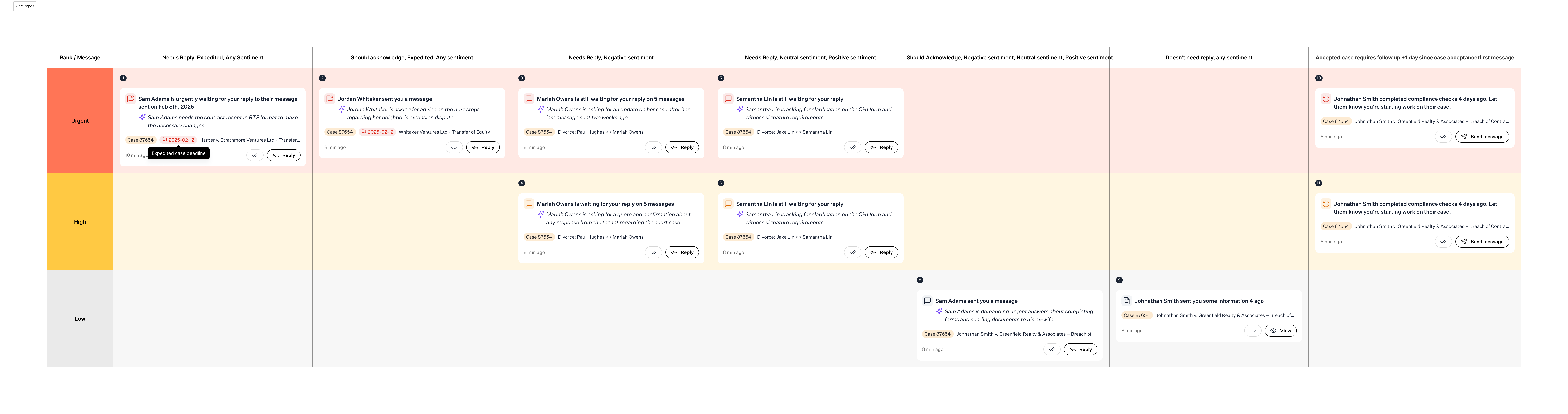
Alert priority evaluation.
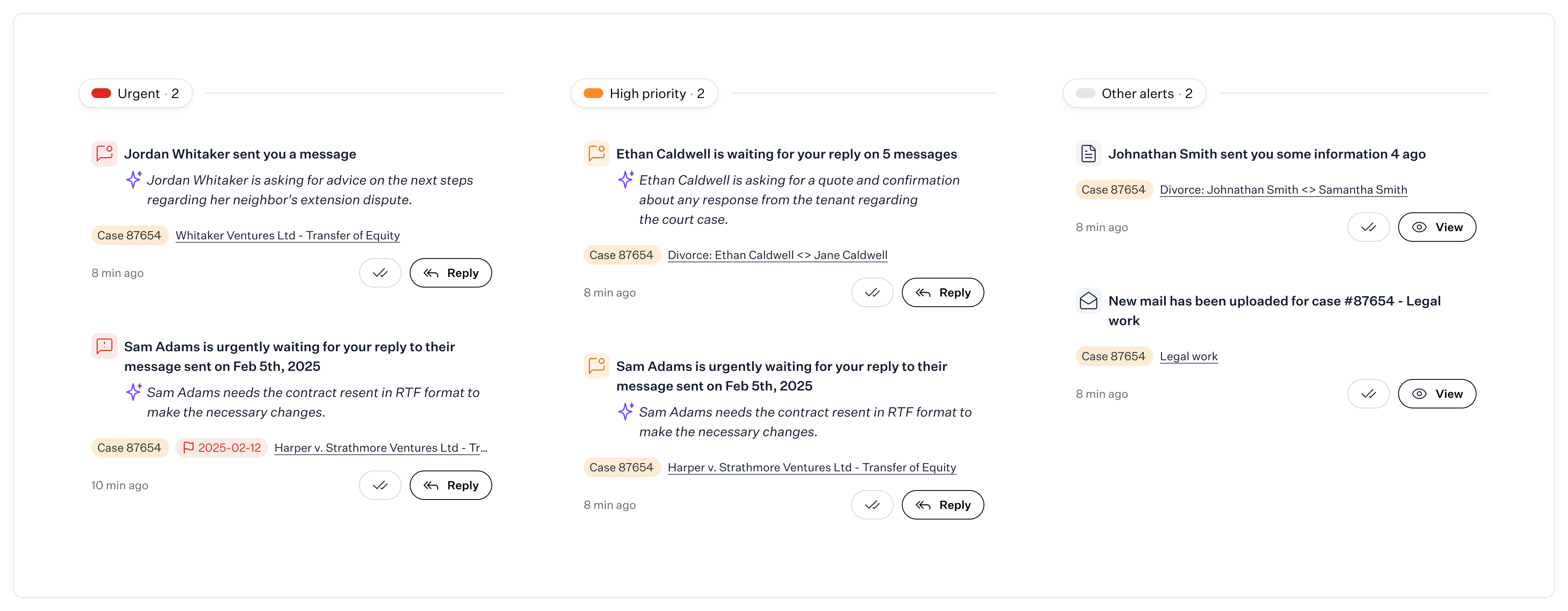
AI-powered prioritization.
AI-generated summaries
Instead of forcing lawyers to open every alert to understand it, we added context upfront. Each alert includes:
- Who — client or case name
- What — AI-generated summary of the request or update
- Why it matters — urgency reasoning (e.g., "Sam Adams needs the contract resent in RTF format to make the necessary changes")
This keeps lawyers informed without requiring them to dig into every thread.
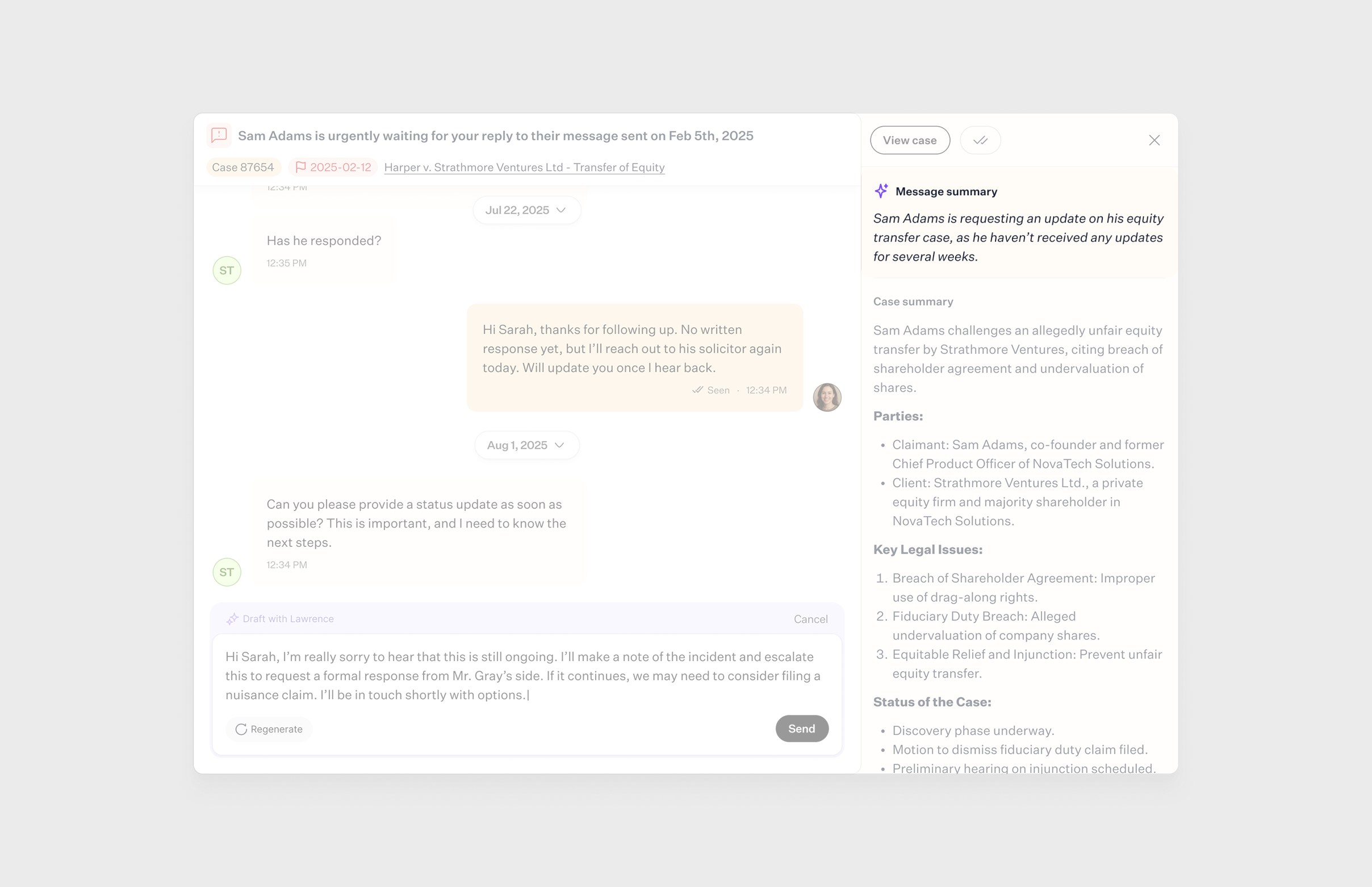
AI-generated summaries
Inline actions
We made it possible to act directly from the alert feed — no need to navigate away or open multiple screens. Depending on the alert type, lawyers can:
- Reply — respond to a client message instantly
- Send message — reach out proactively if a client hasn't responded
- Mark resolved — clear the alert once handled
- View case — jump to the full case details if needed
This removes friction and keeps lawyers moving.
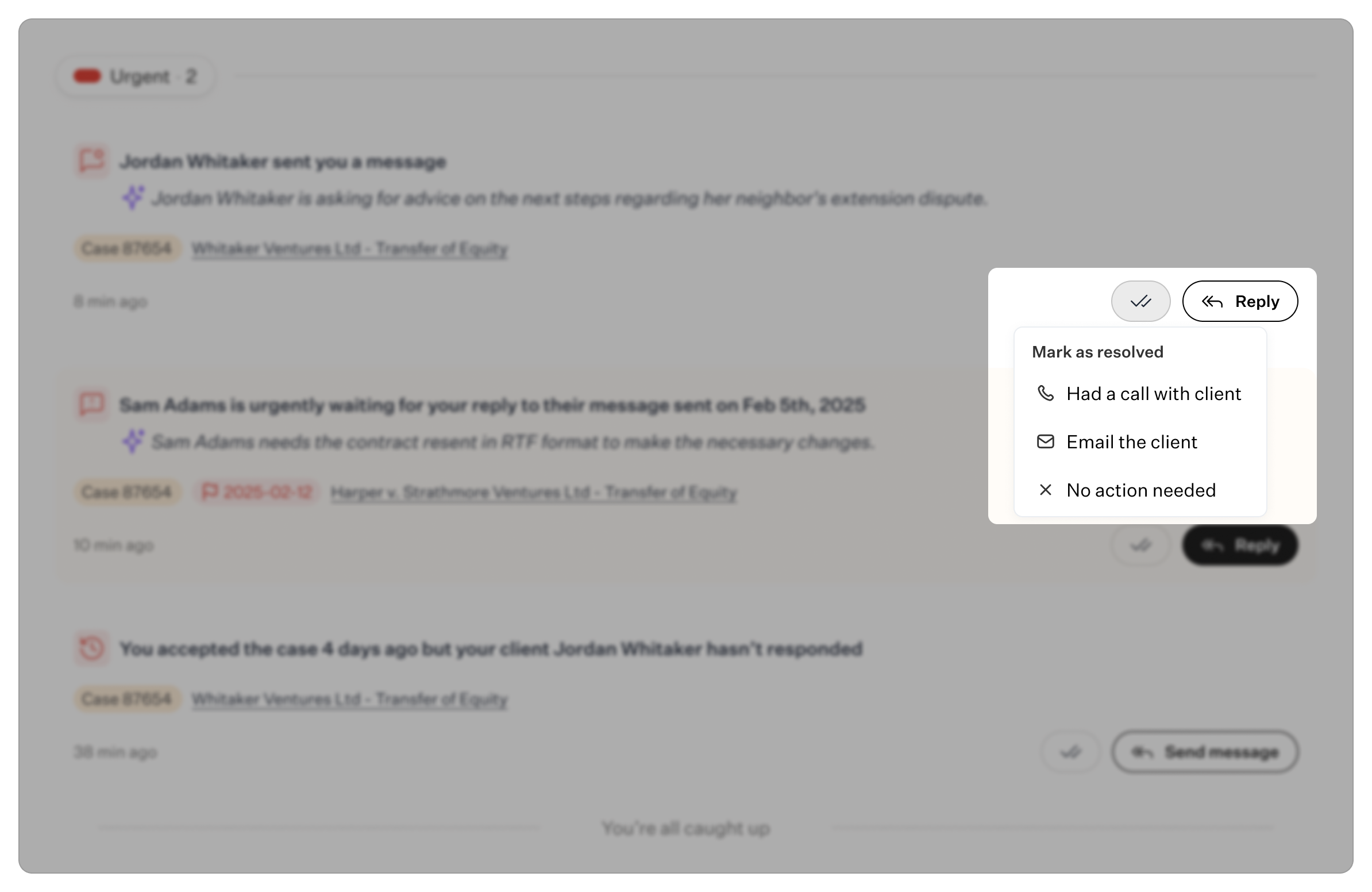
Inline actions.
Why it works
- Reduces cognitive load. Lawyers no longer have to evaluate every alert manually. The system does the triage for them.
- Saves time. AI summaries and inline actions mean fewer clicks and faster decisions. No more opening cases just to understand what's being asked.
- Prevents things from slipping through. Urgent alerts are impossible to miss. High-priority items stay visible. Nothing gets buried.
- Feels human, not robotic. The AI summaries aren't generic — they're contextual and conversational, so lawyers get the information they need without feeling like they're reading system-generated text.
Impact
This wasn't just a UI polish — it fundamentally changed how lawyers interact with the platform. Instead of managing notifications, they're staying on top of their work. Instead of feeling reactive, they're in control.
The alert system became one of the most-used features in LegalOS — and one of the clearest examples of how AI can improve workflows without adding complexity.
Document creation
Lawyers were doing all their document work outside the platform — in Word, Google Docs, or other editors — then manually uploading files back into Lawhive. This created three major issues:
- Time waste. Creating standard legal documents (contracts, letters, agreements) from scratch was slow and repetitive. Every new document meant starting over, copying templates, or hunting for old files to reuse.
- No AI context. Because documents lived outside the system, AI couldn't access case details to help. Lawyers had to manually input client names, case references, dates, and legal specifics every time — defeating the purpose of having an AI-powered platform.
- Fragmented workflow. Switching between tools broke focus and slowed everything down. Draft in Word, save locally, upload to Lawhive, share with client, track changes manually — every step added friction.
The result? A platform that was supposed to streamline legal work was actually adding steps to one of the most time-consuming tasks lawyers do daily.
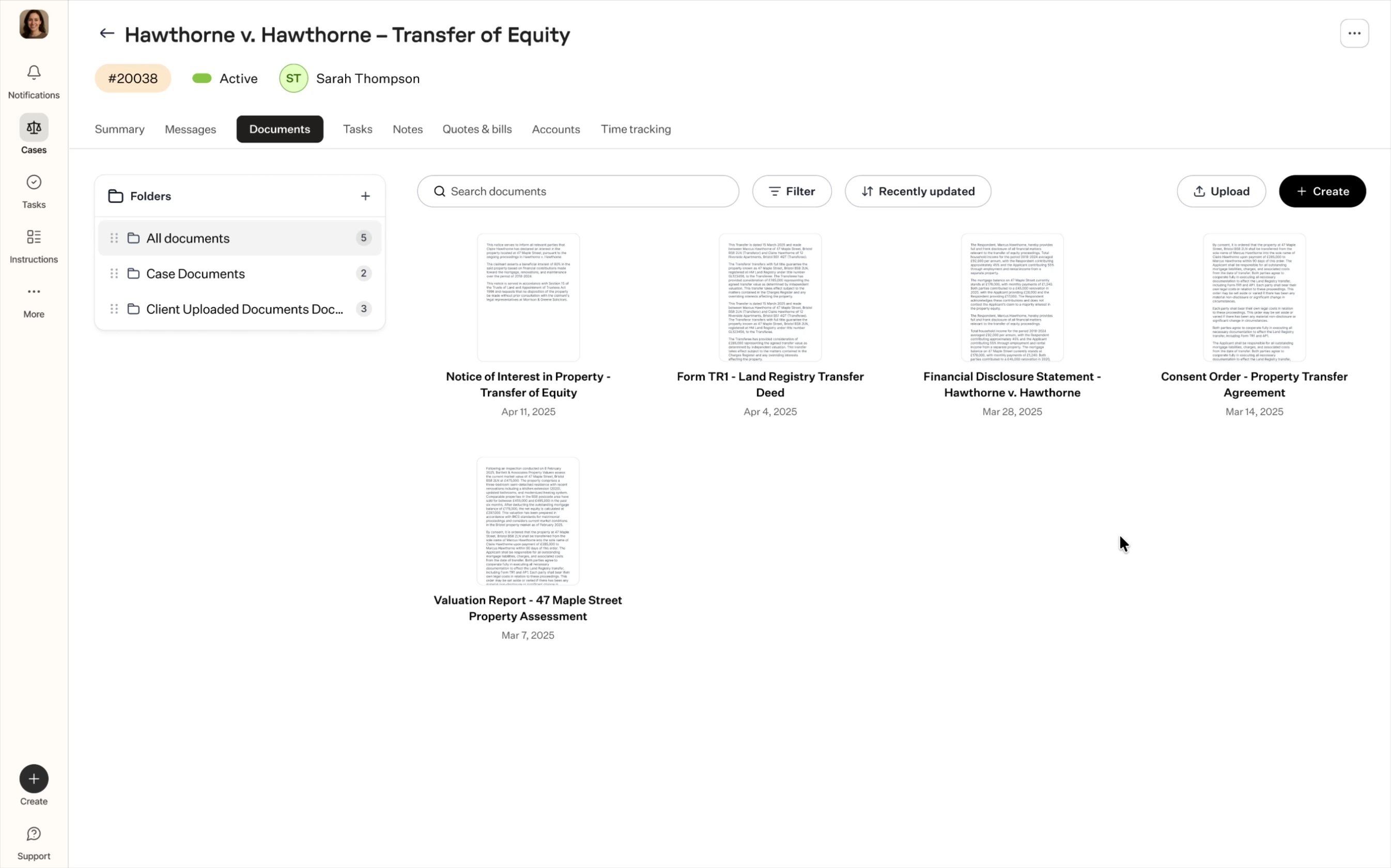
Document creation prototype.
What we designed
We built a native document editor directly into LegalOS — so lawyers could generate, edit, and manage documents without ever leaving the platform.
AI-powered document generation
Instead of starting from blank pages, lawyers can now generate documents using AI that already understands the case context:
- Client names, case numbers, dates, and legal details auto-populate
- AI suggests relevant clauses, language, and structure based on the case type
- Lawyers can generate standard documents (demand letters, contracts, settlement agreements) in seconds — then refine as needed
This turns document creation from a 30-minute task into a 3-minute task.
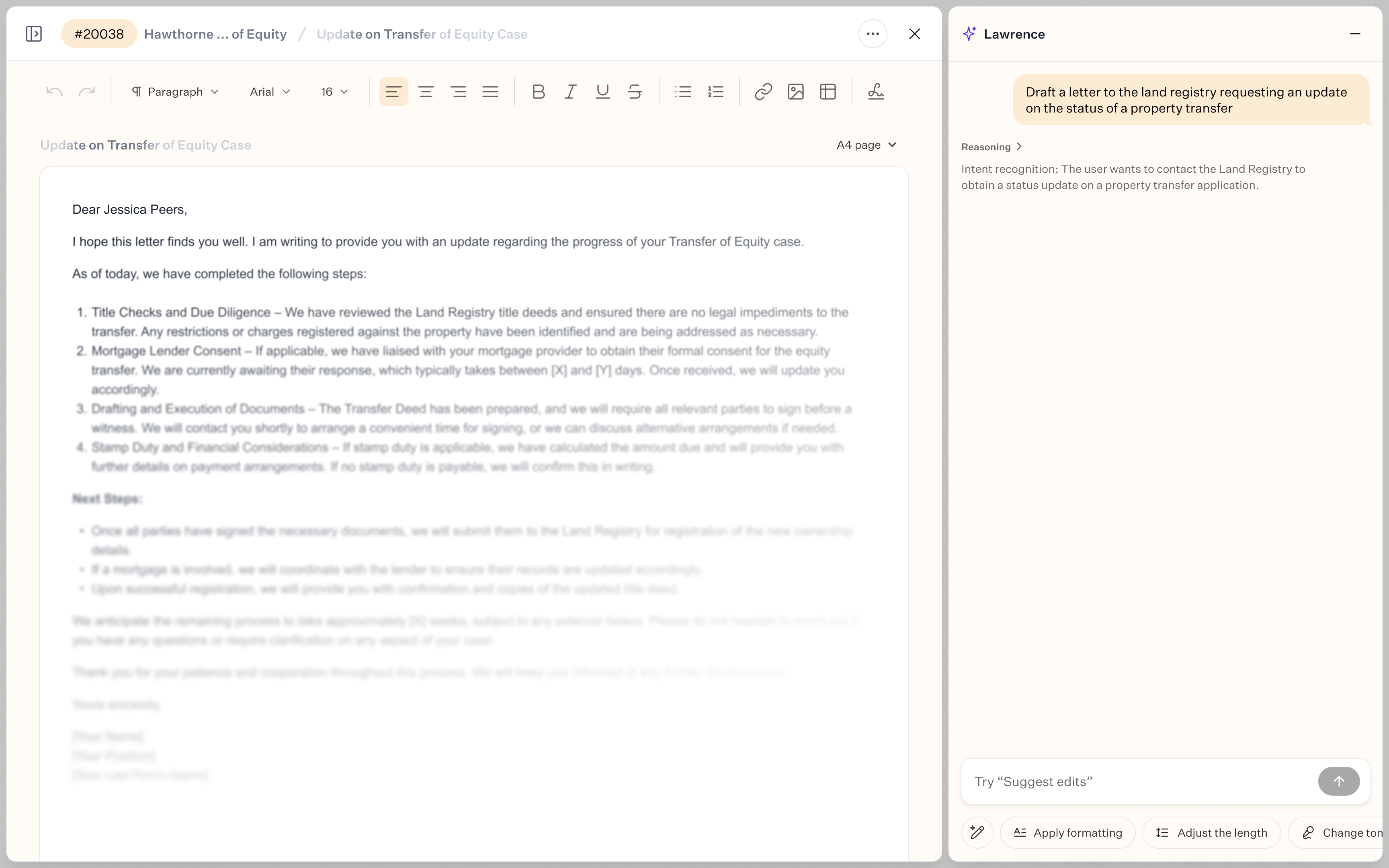
Generating documents in minutes.
Full in-platform editing
We built the editing experience from the ground up, starting with core functionality and progressively enhancing it.
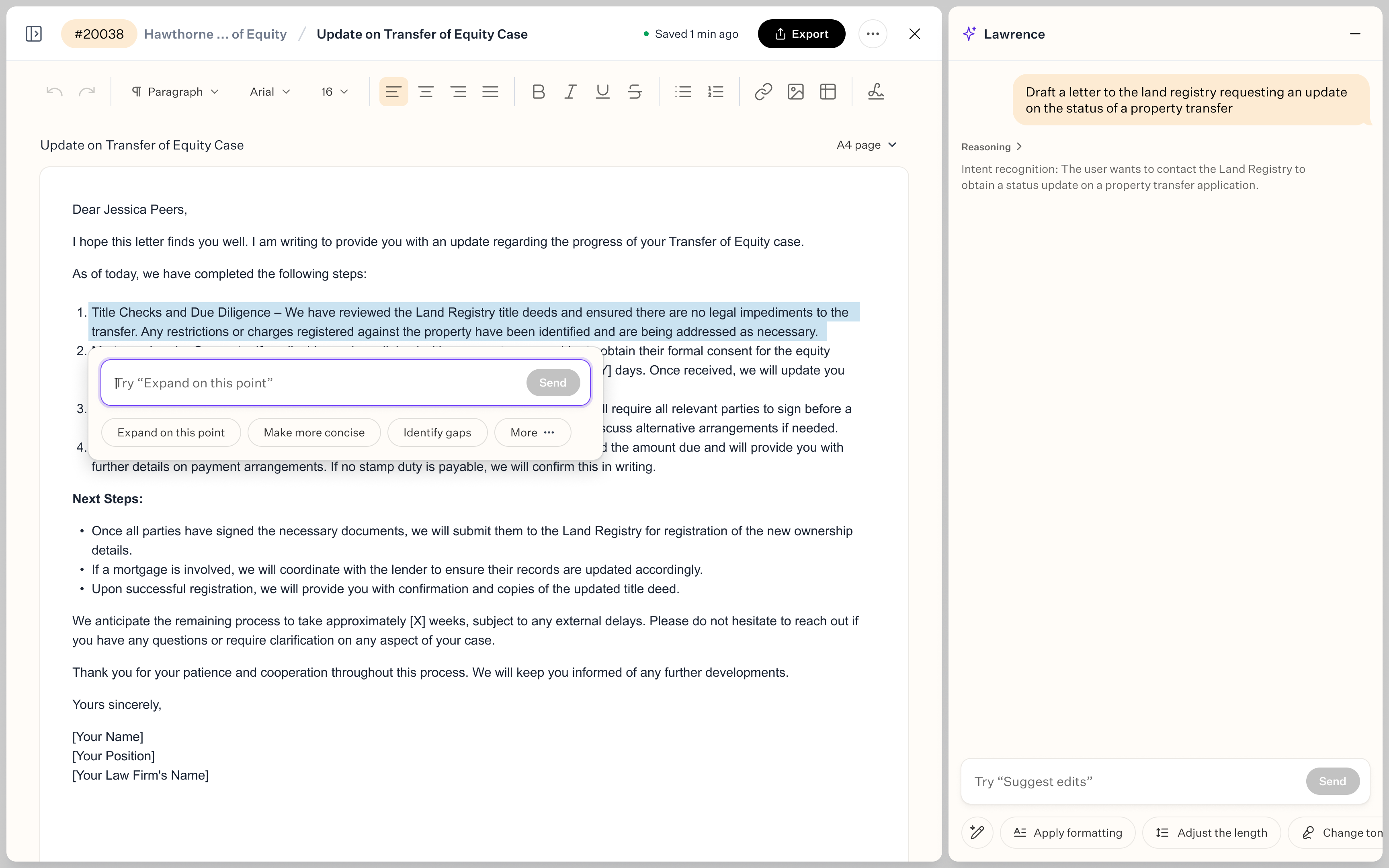
Selecting text in generated document.
Phase 1: Foundation
- Rich text editing (bold, italic, underline, lists)
- Paragraph formatting and structure
- Basic collaboration (edit, save, share)
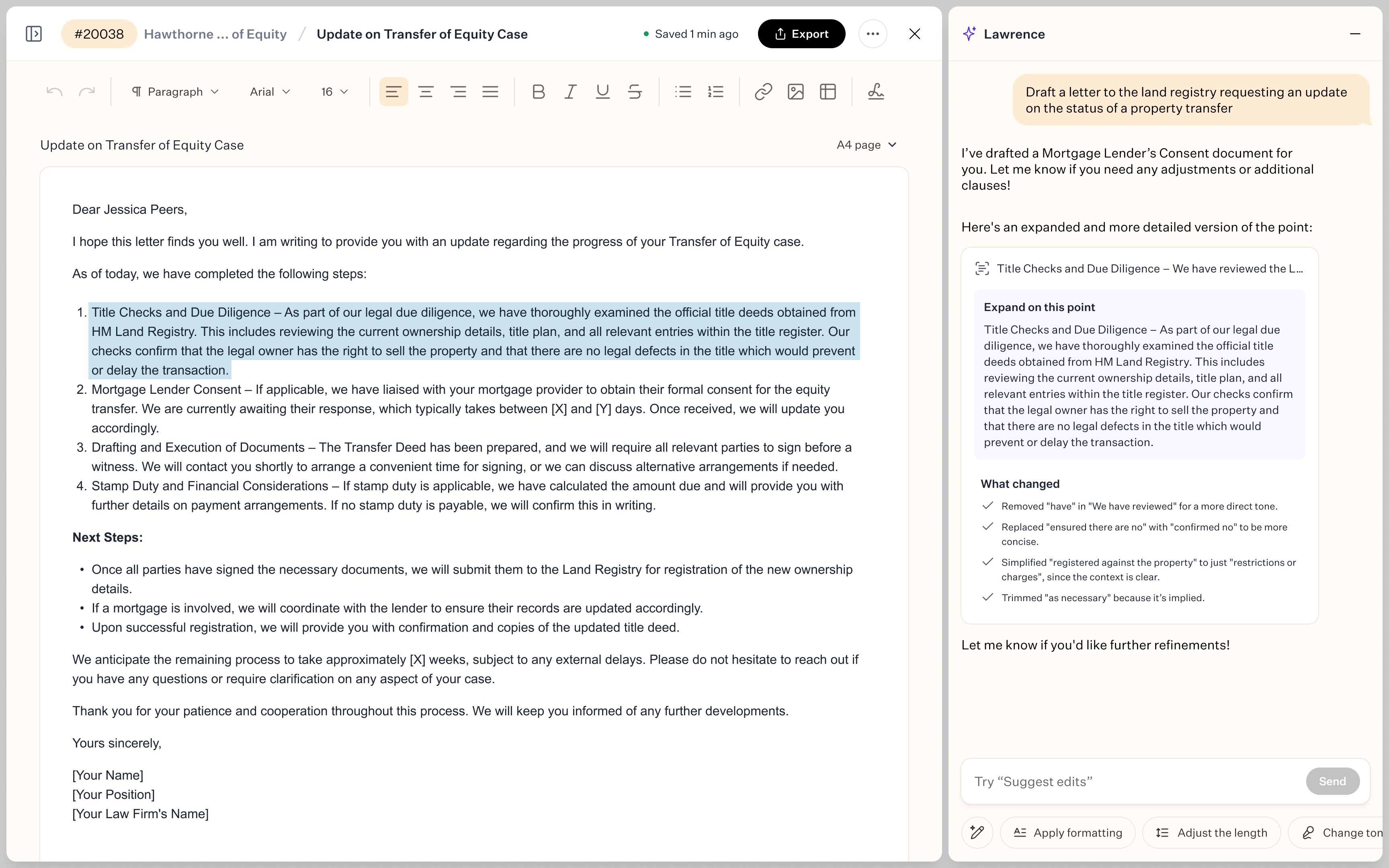
Expanding on selected point with reasoning of what changed.
Phase 2: Professional features
- Version history — track changes, compare drafts, revert to previous versions
- Letterheads — branded templates for client-facing documents
- Signatures — integrated digital signing (no external tools required)
- Tables — for structured data, invoices, schedules
- Smart formatting — automatic legal styling (numbered clauses, indentation, spacing)
This meant lawyers could create professional, client-ready documents entirely within Lawhive — no Word, no exports, no file versioning chaos.
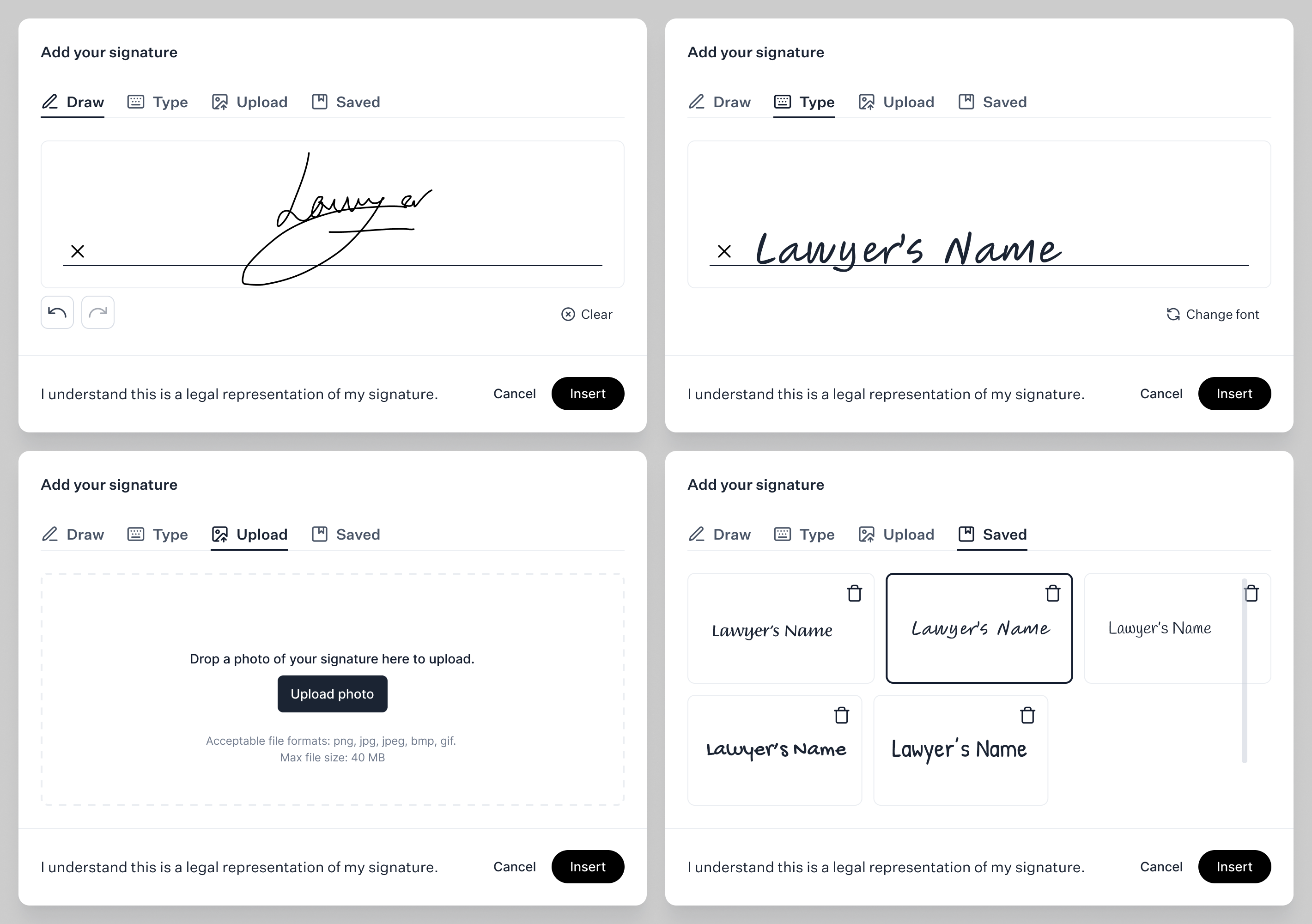
Lawyers can create, type, upload and save signatures.
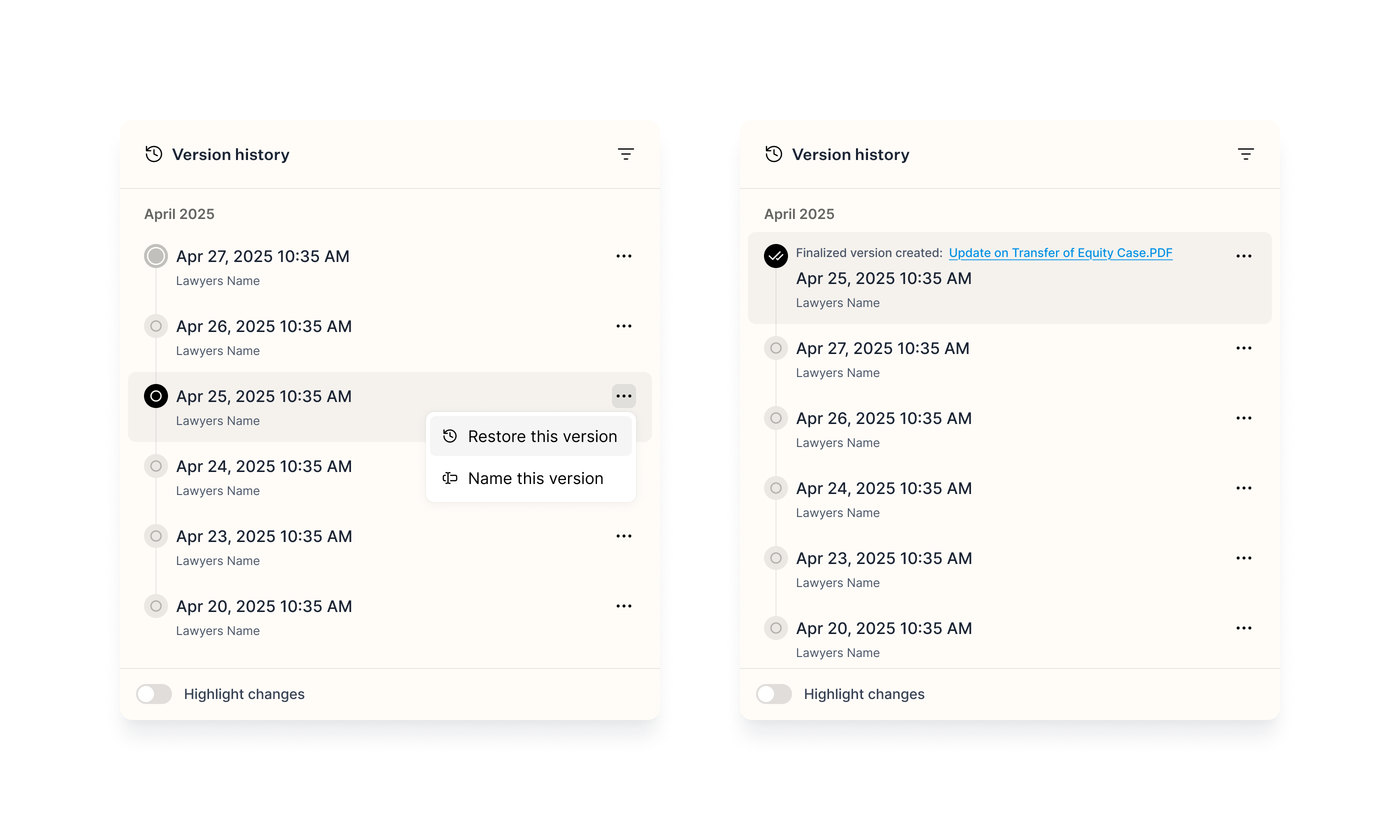
Version history allows to name, restore, and finalize (export & share) any snapshot of the generated document.
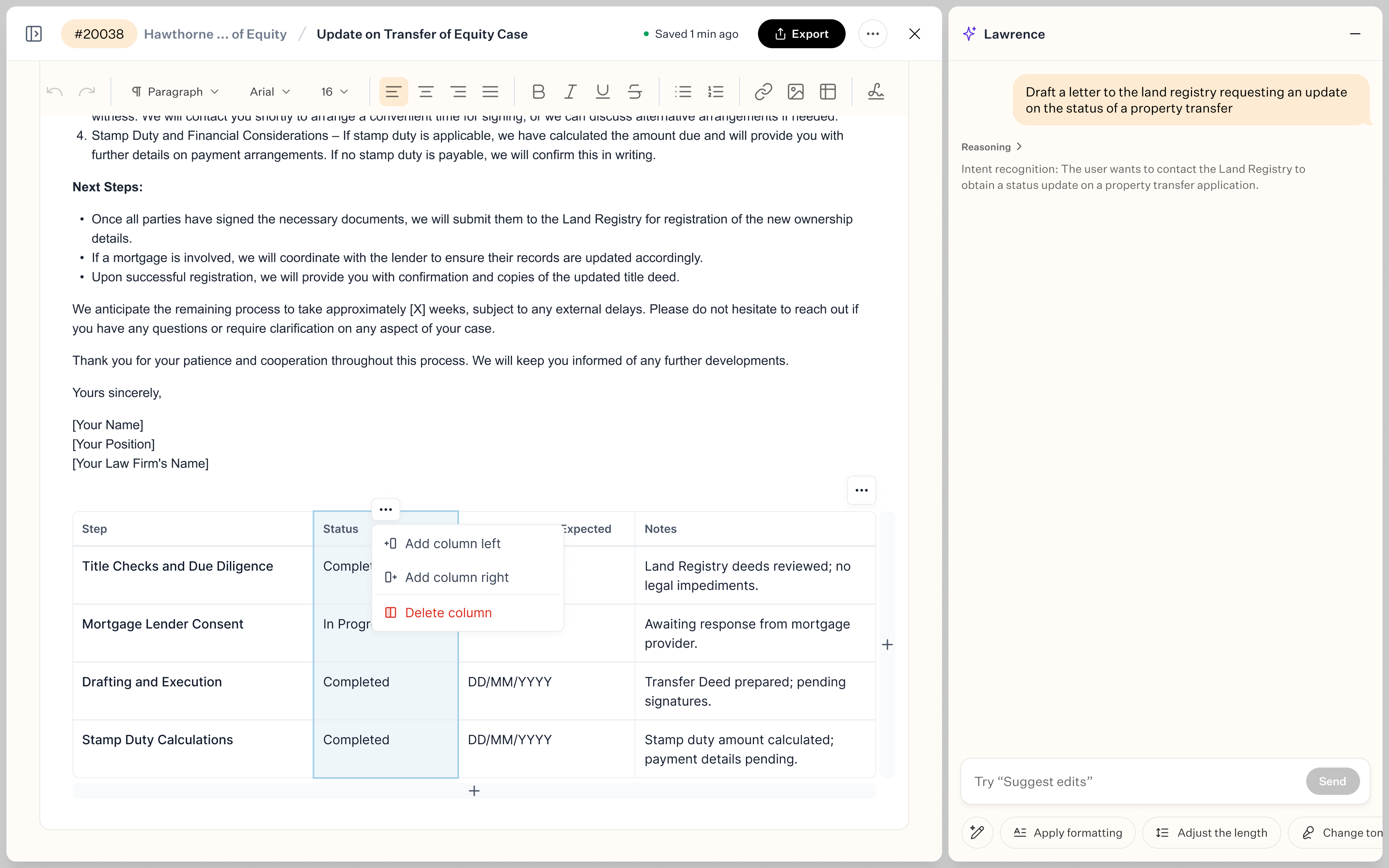
Table customization options.
Integrated document library
All documents now live inside the case context — organized, searchable, and accessible to both lawyers and clients. This means:
- No more hunting through local folders or email threads
- AI can reference past documents to speed up future drafting
- Clients can view, comment, and approve documents without switching tools
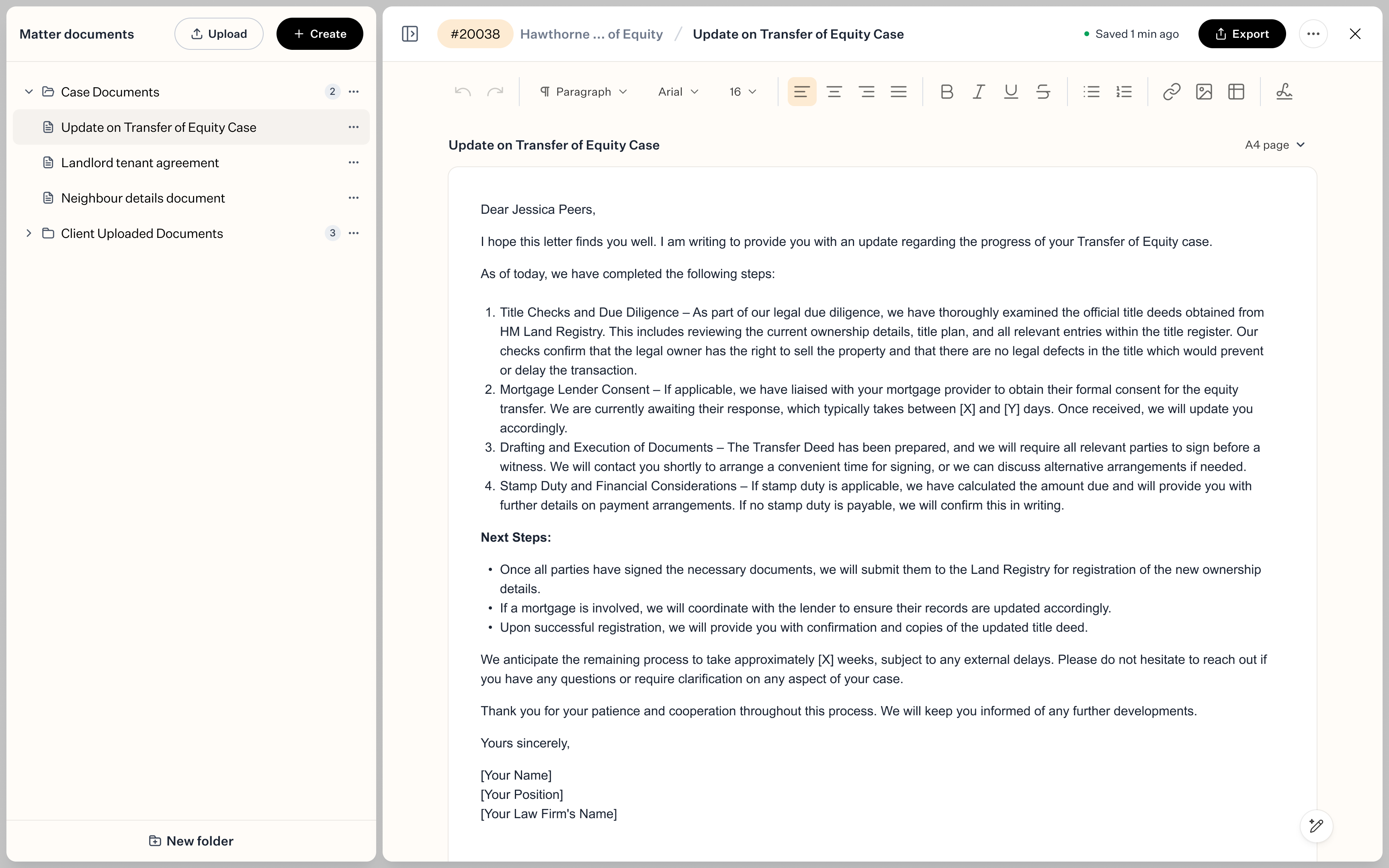
Integrated document library
Impact
This feature fundamentally changed how lawyers use Lawhive. Instead of treating the platform as a case tracker with file storage, it became a true workspace — where drafting, editing, and collaboration all happen in one place.
Document creation went from being a slow, external process to a fast, integrated workflow. And because AI had case context, it could finally do what it was meant to do: save time and reduce repetitive work.
Form filling
Legal forms are brutal. They're long (some run 63+ pages), stored as PDFs, and packed with repetitive fields that require precise, case-specific information.
Lawyers had to fill them entirely by hand — scrolling through dozens of pages, copying client details from case files, and manually entering data into every field. Miss one checkbox or misspell a name, and the form gets rejected.
This wasn't just slow — it was soul-crushing work. Hours spent on administrative data entry instead of actual legal strategy. And because forms lived outside the platform as static PDFs, there was no way for AI to help. Lawyers were stuck doing it the old way: open PDF, find field, type data, repeat 200 times.
The result? Form filling was one of the most time-consuming and error-prone tasks in the entire legal workflow.
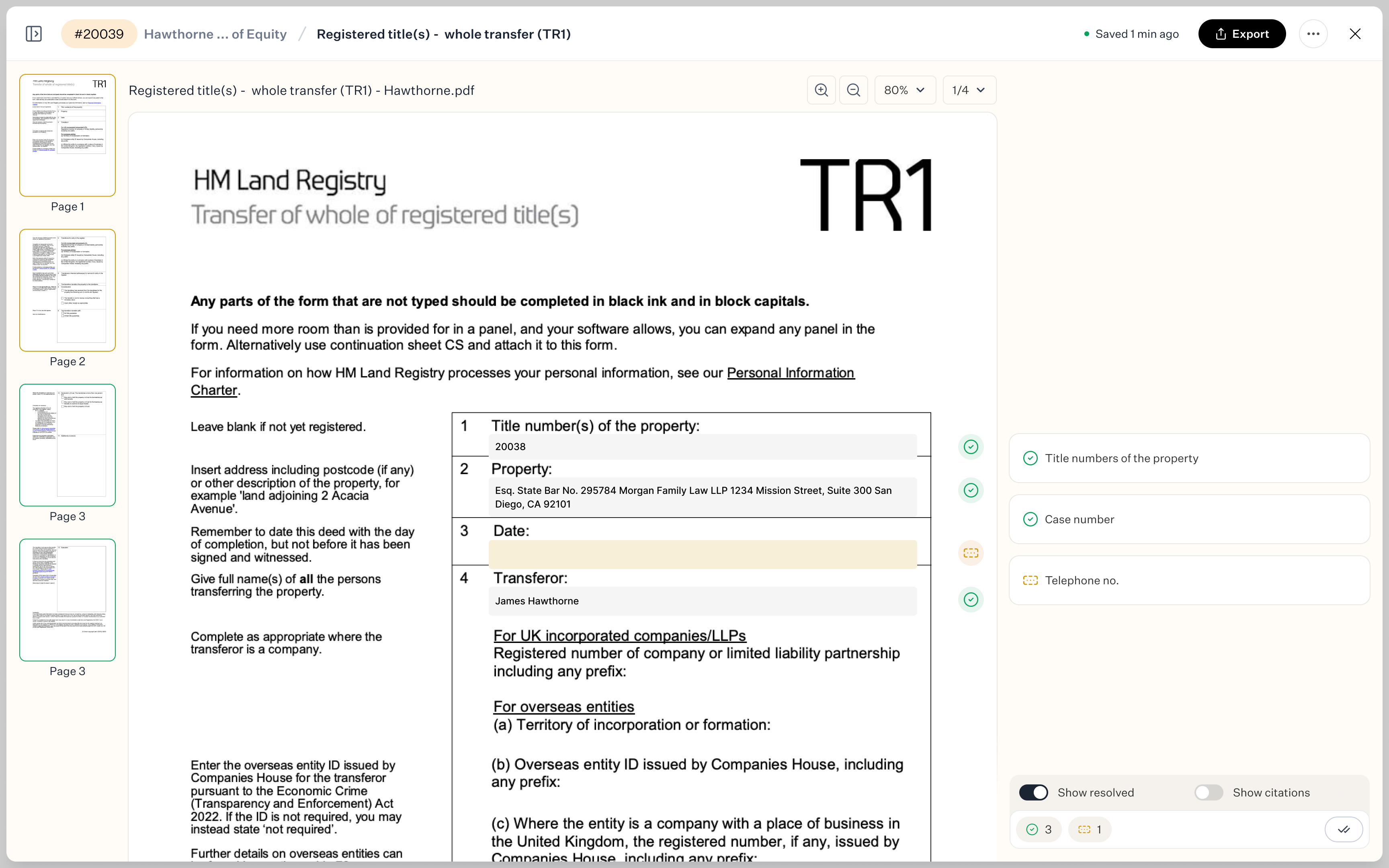
Simple form filing.
What we designed
We built an AI-powered form filling system that reads legal forms, auto-populates fields using case context, and gives lawyers full control over what gets submitted.
AI reads and fills the form automatically
Instead of forcing lawyers to fill every field manually, the system now:
- Parses the PDF form — identifies all fields, checkboxes, dropdowns, and signatures
- Pulls case context — uses existing client data, case details, dates, and legal information already in the system
- Auto-fills everything it can — name, address, case number, dates, standard legal clauses, etc.
This happens in seconds. A 63-page form that used to take hours now gets pre-filled instantly.
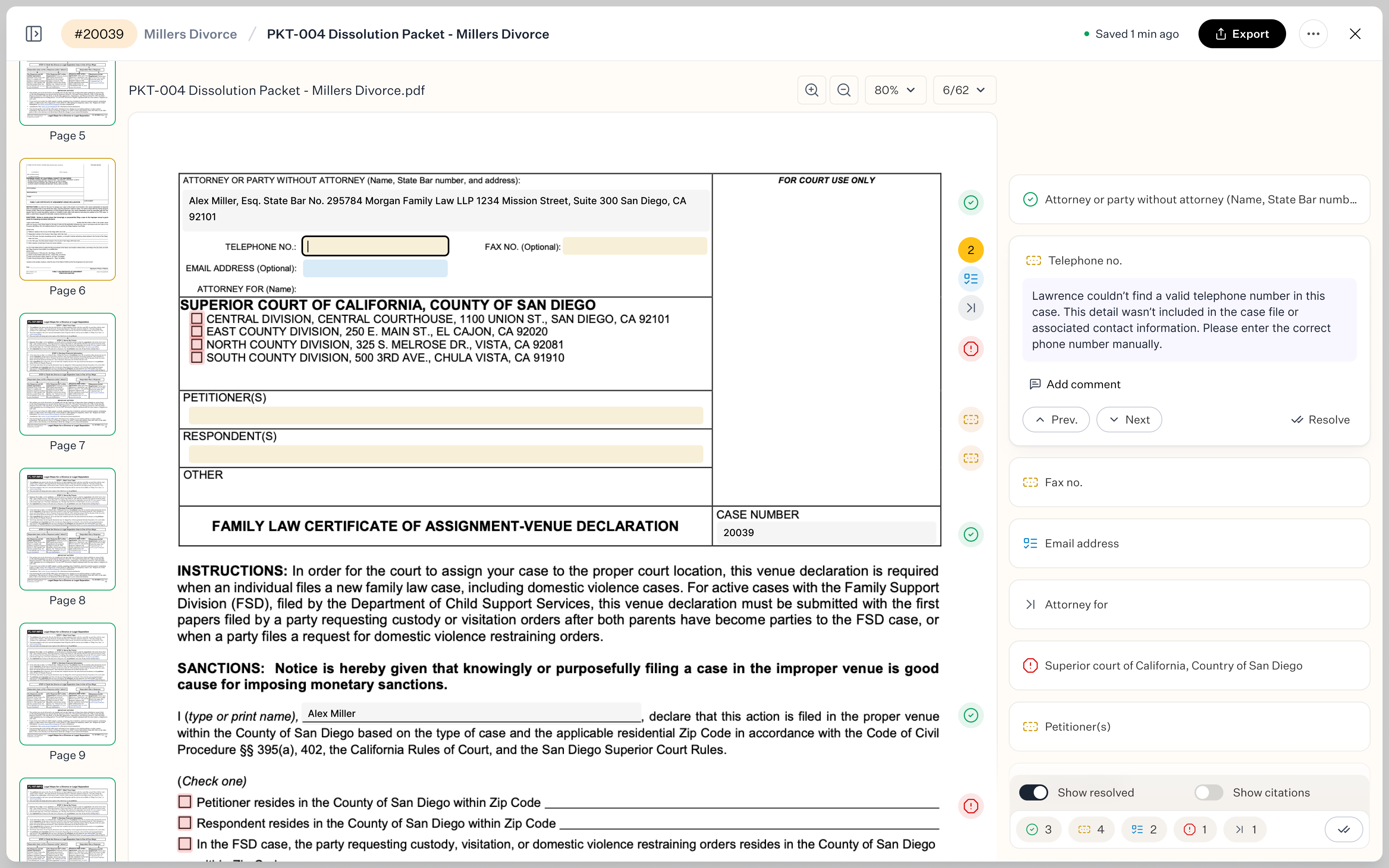
Previewing incomplete form field.
Smart highlighting shows what needs attention
AI doesn't just fill the form and call it done — it shows lawyers exactly what it did and what it couldn't do. The system uses color-coded highlighting:
- Green — field successfully filled by AI
- Yellow — field skipped because the system didn't have enough context (e.g., "Plaintiff's preferred settlement amount")
- Blue — multiple options available, lawyer needs to choose (e.g., checkboxes for case type or jurisdiction)
This means lawyers don't have to review every single field — they only focus on what actually needs their input.
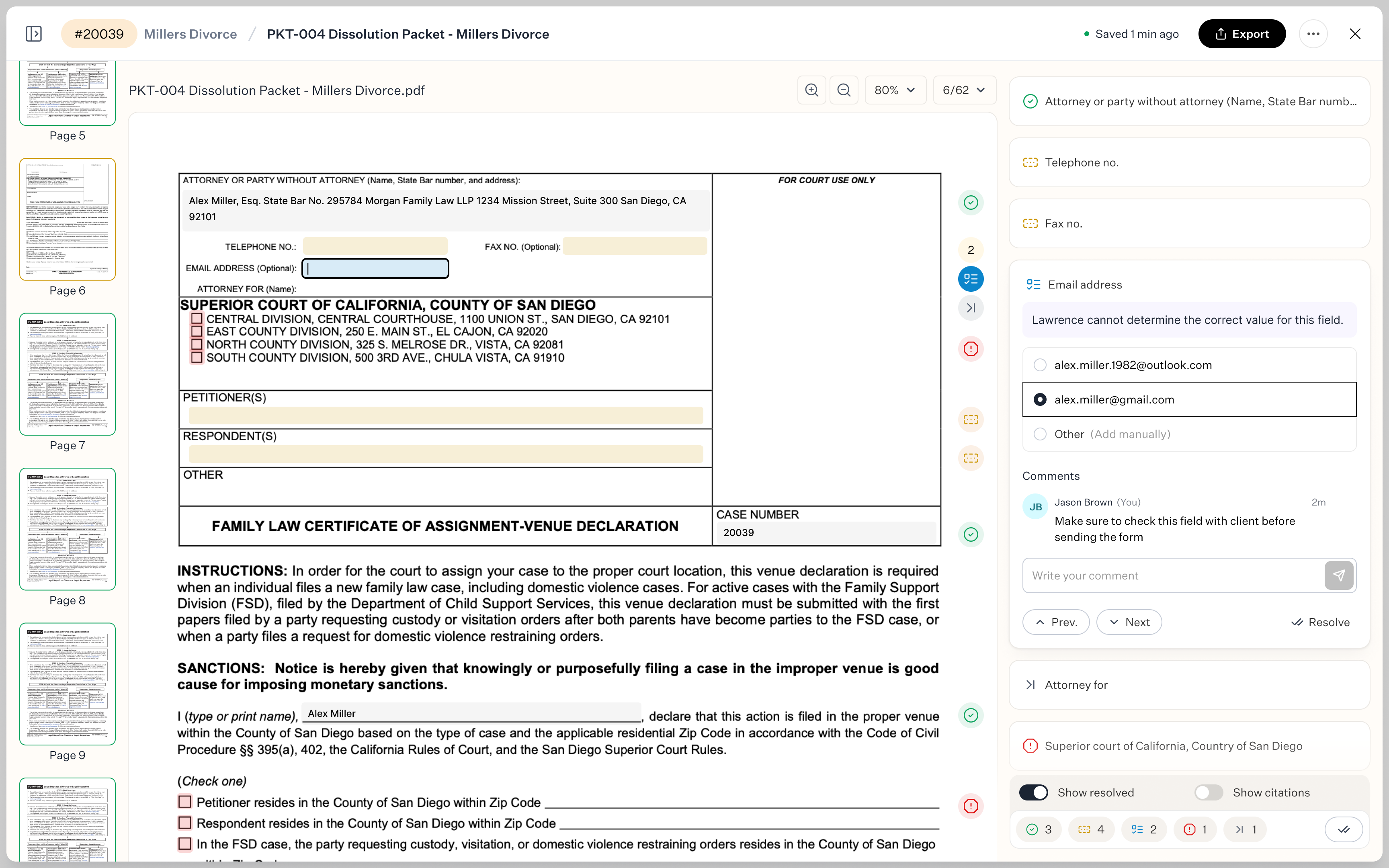
Previewing form field with multiple options available.
Lawyers stay in control
The AI doesn't submit anything automatically. After auto-filling, the lawyer reviews:
- What was filled — verify accuracy, make edits if needed
- What was skipped — fill in missing details or provide additional context
- What needs a decision — select from multiple options where AI couldn't determine the right choice
Once reviewed, the form is ready to submit — accurate, complete, and done in a fraction of the time.
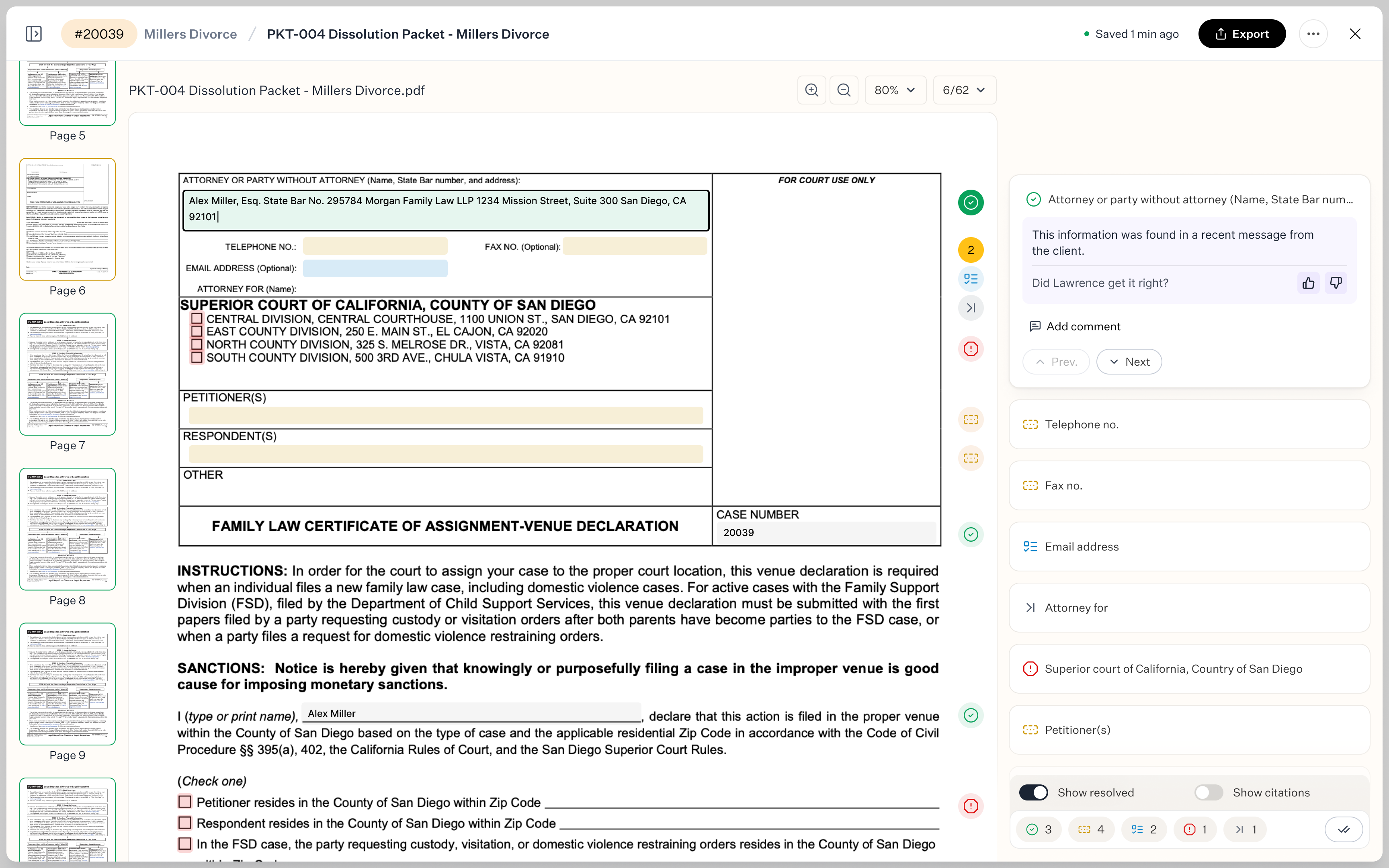
Completed form field review.
Impact
- 75% time reduction. Forms that used to take 2-3 hours now take 20-30 minutes. Lawyers skip the repetitive data entry and focus only on the fields that actually require legal judgment.
- Fewer errors. AI pulls data directly from case files, so there's no manual transcription. Client names, case numbers, and dates are always accurate — no typos, no mismatched details.
- Lawyer stays in control. This isn't autopilot — it's intelligent assistance. The system handles the grunt work, but the lawyer makes the final decisions. That's critical in legal work, where precision and accountability matter.
- Scales across form types. Whether it's a 5-page intake form or a 63-page court filing, the system works the same way. AI adapts to the structure, fills what it can, and flags what needs attention.
Closing thoughts
Lawhive was a unique project in that it was high-impact, fast-paced, and based on genuine teamwork. In addition to improving the platform's appearance, we delivered features that radically altered the way attorneys operate.
AI evolved from a trendy term to a useful tool for increasing productivity. Previously involving numerous apps and hours of manual labor, workflows now took place in a single location in a matter of minutes.
It wasn't all flawless. Sometimes we sacrificed consistency in favor of speed. We had to rebuild patterns that we ought to have reused because we lacked a design system. Priorities changed, communication breakdowns occurred, and MVPs were consistently smaller than we had hoped.
However, what is currently in place is already having an impact: it saves time, lowers errors, and frees up attorneys to concentrate on legal strategy rather than administrative burdens.
Lawhive has a strong base. Making the connections between disparate elements into a cohesive system that feels intentional, essential, and cohesive is the next stage.